代理和反向代理

代理 (正向)代理 代理一般是指正向代理,比如翻墙软件shadowsocks就是一种正向代理。 shadowsocks通过socks 5协议 在代理服务器上, 代理我们(client)去访问被墙的资源(google/twitter/Facebook等服务器)。 A proxy server, sometimes referred to as a forward proxy, is a server that routes traffic between client(s) and another system, usually external to the network. By doing so, it can regulate traffic according to preset policies, convert and mask client IP addresses, enforce security protocols, and block unknown traffic. 反向代理 反向代理是说我们(client)被代理了, 我们自己还不知道。 我们以为和我们打交道的(处理我们的请求)的是nginx 服务器,其实nginx真正处理我们请求的是ngix后面的upstream在 处理我们的请求逻辑。 ...

May 19, 2017 · datewu

缓存静态文件

众所周知nginx有很强的分发静态文件的能力,很多时候nginx对静态资源分发能力的瓶颈和redis一样在主机的网卡上。 (一般虚拟机的网卡只有500mbps,如果你使用的是万兆的物理网卡就当我没说) 和redis对比,nginx有另外一个瓶颈在服务器的硬盘IO上,SSD硬盘情况会好一些, 所以很多情况下,我们会把 nginx的cache 做在系统的ssd硬盘上, 其实还可以直接把cache放到内存文件系统里,进一步提升磁盘io吞吐。 tmpfs differences between ramfs and tmpfs 1 2 3 4 5 #!/bin/bash mkdir /mnt/ramdisk mount -t tmpfs -o size=512m tmpfs /mnt/ramdisk echo 'tmpfs /mnt/ramdisk tmpfs nodev,nosuid,noexec,nodiratime,size=1024M 0 0' >> /etc/fstab nginx http cache config 1 2 3 4 5 6 http { more_set_headers 'Server: CachedLOL'; proxy_cache_path /var/cache/nginx levels=1:2 use_temp_path=on keys_zone=one:500m max_size=5g inactive=120m; proxy_temp_path /var/cache/nginx/tmp 1 2; } location conf 1 2 3 4 5 6 7 8 9 10 11 12 13 14 15 16 17 18 19 20 21 22 upstream upV1 { server 172.26.2.5:9090 fail_timeout=0; server 172.26.2.6:9090 fail_timeout=0; } server { listen 80 default backlog=16384; server_name tab.deoops.com; location ~* ( /static.*|/list.+|/ )$ { proxy_redirect off; proxy_cache one; proxy_ignore_headers "Set-Cookie"; proxy_hide_header "Set-Cookie"; add_header X-Cache $upstream_cache_status; proxy_cache_key $uri$is_args$args$mobile; proxy_cache_min_uses 1; proxy_cache_valid 120m; proxy_cache_use_stale error timeout; proxy_buffering on; proxy_pass http://upV1; }

April 29, 2017 · datewu

安装配置openvpn

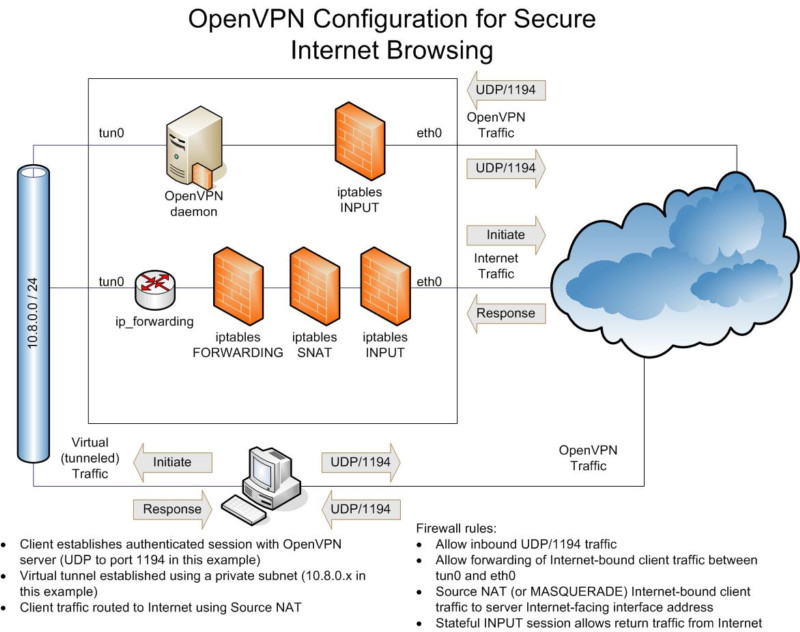
开发需要能调用facebook的接口,我们运维这边需要配置一台测试服务器能访问facebook,用shadowsocks 和squid 代理,性能不够好。所以决定上openvpn。 简单记录下openVPN的安装配置过程,服务端和客户端使用的操作系统均是centos 7。 服务端 安装 1 2 3 #!/bin/bash yum install epel-release -y yum install openvpn openssl -y 自签名证书 使用openssl工具生产自签名的ca,证书,client.key,并把这些证书传给客户端: 1 2 3 4 5 6 7 8 9 10 11 12 13 14 15 16 17 18 19 20 21 22 23 24 25 26 #!/bin/bash ### CA openssl dhparam -out /etc/openvpn/dh.pem 2048 openssl genrsa -out /etc/openvpn/ca.key 2048 openssl req -new -key /etc/openvpn/ca.key -out /etc/openvpn/ca.csr -subj /CN=OpenVPN-CA/ openssl x509 -req -in /etc/openvpn/ca.csr -out /etc/openvpn/ca.crt -signkey /etc/openvpn/ca.key -days 3650 echo 01 > /etc/openvpn/ca.srl chmod 600 /etc/openvpn/ca.key ### Server openssl genrsa -out /etc/openvpn/server.key 2048 openssl req -new -key /etc/openvpn/server.key -out /etc/openvpn/server.csr -subj /CN=OpenVPN/ openssl x509 -req -in /etc/openvpn/server.csr -out /etc/openvpn/server.crt -CA /etc/openvpn/ca.crt -CAkey /etc/openvpn/ca.key -days 3650 chmod 600 /etc/openvpn/server.key ### Client openssl genrsa -out /etc/openvpn/client.key 2048 openssl req -new -key /etc/openvpn/client.key -out /etc/openvpn/client.csr -subj /CN=OpenVPN-Client/ openssl x509 -req -in /etc/openvpn/client.csr -out /etc/openvpn/client.crt -CA /etc/openvpn/ca.crt -CAkey /etc/openvpn/ca.key -days 3650 chmod 600 /etc/openvpn/client.key ### 把clinet的证书私钥和ca正式传给客户端 scp /etc/openvpn/ca.crt /etc/openvpn/client.crt /etc/openvpn/client.key client: 配置 服务端配置文件: 1 2 3 4 5 6 7 8 9 10 11 12 13 14 15 16 17 18 19 20 21 22 # /etc/openvpn/server.conf server 10.8.0.0 255.255.255.0 verb 3 key /etc/openvpn/server.key ca /etc/openvpn/ca.crt cert /etc/openvpn/server.crt dh /etc/openvpn/dh.pem keepalive 10 120 persist-key persist-tun comp-lzo push "redirect-gateway def1 bypass-dhcp" push "dhcp-option DNS 8.8.8.8" push "dhcp-option DNS 8.8.4.4" user nobody group nogroup proto udp port 1194 dev tun1194 status openvpn-status.log kernel iptables 打开服务器路由配置: ...

February 20, 2017 · datewu

Ansible

本文不定期更新 :) A system administrator’s guide to getting started with Ansible ad-hoc 管理集群的时候,常常来不及写playbooks,只需要执行一些ad-hoc查看某些主机的状态, 或者批量修改/上传配置文件到某些主机。 1 2 ansible all -m copy -a \ 'src=dvd.repo dest=/etc/yum.repos.d owner=root group=root mode=0644' -b playbook 1 ansible-playbook -i prod_hosts demo.yml --skip-tag downloaded host file 1 2 3 4 5 6 7 [api] tt ansible_host=test tt3 ansible_host=test3 tt8 ansible_host=test8 [db] pg1 ansible_host=db88 pg2 ansible_host=db98 task 1 2 3 4 5 6 7 8 9 10 11 12 13 14 15 16 17 18 19 20 21 22 23 24 25 26 27 28 29 30 31 32 33 34 35 36 37 38 # demo.yml --- - hosts: db vars: tar_src: "tars/postgres_exporter_v0.4.1_linux-amd64.tar.gz" tar_dest: "/usr/bin/" service_src: "services/postgres_exporter.service" service_dest: "/usr/lib/systemd/system/" # works on centos; ubuntu is '/etc/systemd/system/ tasks: - debug: var=ansible_default_ipv4.address - name: untar to /usr/bin unarchive: src: "{{ tar_src }}" dest: "{{ tar_dest }}" become: true - name: download and untar prometheus tarball tags: downloaded unarchive: src: "{{ prometheus_tarball_url }}" dest: "{{ prometheus_install_path }}" copy: no - name: copy service file copy: src: "{{ service_src }}" dest: "{{ service_dest }}" become: true - name: ensure node_export is ebalbe and running systemd: name: postgres_exporter enabled: yes daemon_reload: yes state: started become: true

April 16, 2016 · datewu

tcp性能调优

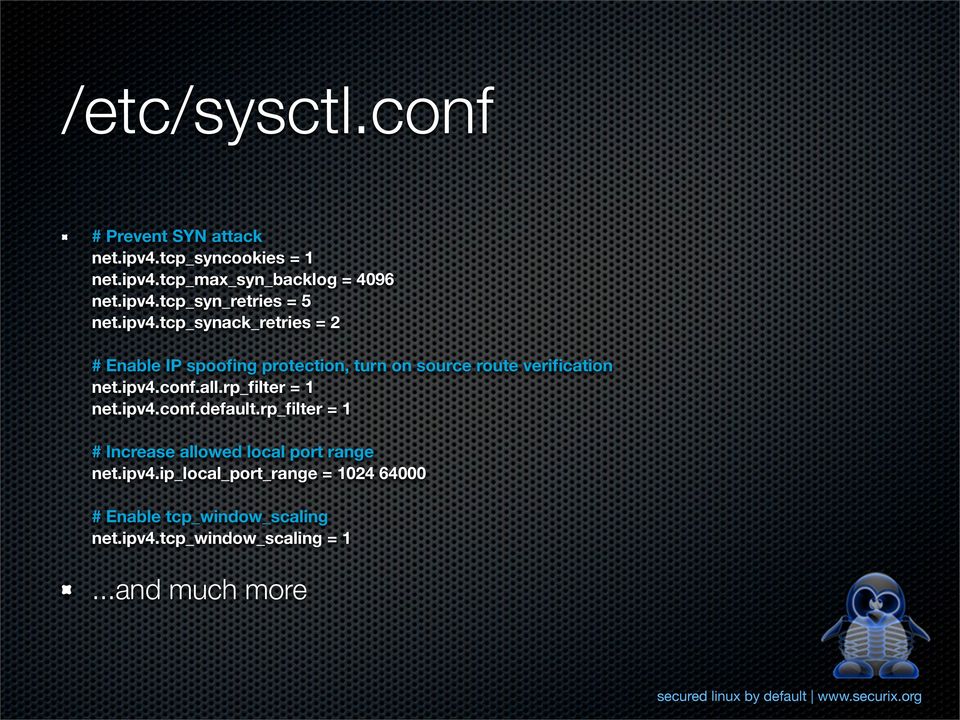
我们一般会调整内核tcp参数以提高web服务器(比如ngin)的性能。 sysctl 加载Linux 内核配置 1 sysctl -p /etc/sysctl.d/xxx-xxx.conf meat 1 2 3 4 5 6 7 8 9 10 11 12 13 14 15 16 17 18 19 20 21 22 23 24 # /etc/sysctl.d/00-network.conf # Receive Queue Size per CPU Core, number of packets # Example server: 8 cores net.core.netdev_max_backlog = 4096 # SYN Backlog Queue, number of half-open connections net.ipv4.tcp_max_syn_backlog = 32768 # Accept Queue Limit, maximum number of established # connections waiting for accept() per listener. net.core.somaxconn = 65535 # Maximum number of SYN and SYN+ACK retries before # packet expires. net.ipv4.tcp_syn_retries = 1 net.ipv4.tcp_synack_retries = 1 # Timeout in seconds to close client connections in # TIME_WAIT after receiving FIN packet. net.ipv4.tcp_fin_timeout = 5 # Disable SYN cookie flood protection net.ipv4.tcp_syncookies = 0 # Maximum number of threads system can have, total. # Commented, may not be needed. See user limits. #kernel.threads-max = 3261780 # Maximum number of file descriptors system can have, total. # Commented, may not be needed. See user limits. #fs.file-max = 3261780
April 5, 2016 · datewu

字符串

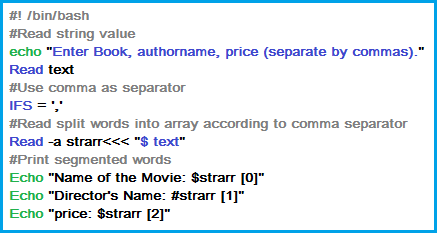
运维人员/系统管理员每天要在终端敲入大量命令,也要修改查看大量文本配置文件,日志信息。 甚至可以夸张一点说Linux/Unix system admin的全部工作就是和字符串打交道。 binary 大家都知道文本文件是字符串组成的,其实二进制文件里面其实也包含了很多字符串: 1 2 3 4 5 6 7 8 9 10 11 12 13 14 ➜ infra-api git:(dev) file infra-api infra-api: Mach-O 64-bit executable x86_64 ➜ infra-api git:(dev) strings infra-api | head flag hash mime path sort sync time *int AAAA Addr ➜ infra-api git:(dev) 命令 收集一些常用的shell 字符串操作命令 cut 1 2 3 4 5 6 7 8 9 10 11 12 13 14 15 16 ❯ tldr cut Cut out fields from stdin or files. More information: https://www.gnu.org/software/coreutils/cut. - Cut out the first sixteen characters of each line of stdin: cut -c 1-16 - Cut out the first sixteen characters of each line of the given files: cut -c 1-16 file - Cut out everything from the 3rd character to the end of each line: cut -c 3- - Cut out the fifth field of each line, using a colon as a field delimiter (default delimiter is tab): cut -d':' -f5 - Cut out the 2nd and 10th fields of each line, using a semicolon as a delimiter: cut -d';' -f2,10 - Cut out the fields 3 through to the end of each line, using a space as a delimiter: cut -d' ' -f3- cat/less cat,主要有三大使用场景: ...

May 17, 2015 · datewu

谢谢vpngate

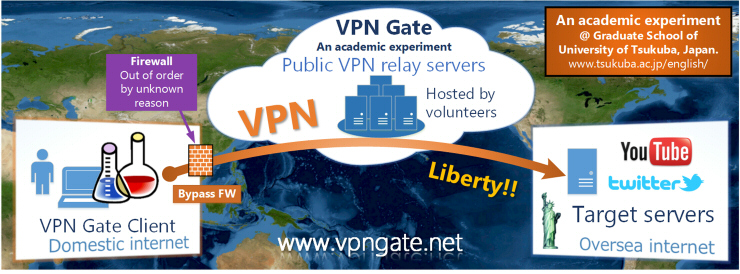
在天朝呆久了,有点迫害妄想症。用vpngate出来转转看看,发现确实是我想多了。 anyway,谢谢vpngate,挺不错的vpn。

May 9, 2014 · datewu